Helping businesses grow through strategy, systems & standout marketing ✨Specializing in SEO, digital ads, social media marketing, branding, website design, and Factional Chief of Operations services.
I'm Madisyn, ceo and founder of wasson marketing management
Cloud Campaign Review: The Best Social Media Management Tool for Agencies (2025)
If you’re managing social media for multiple clients, you’ve probably experienced that familiar feeling: drowning in spreadsheets, lost in endless email threads, and constantly switching between platforms just to schedule a few posts.
We’ve been there. And we found the solution that changed everything for our agency.
Cloud Campaign is specifically designed for agencies and social media managers who handle multiple clients, and after using it extensively at Wasson Management + Marketing, we can confidently say it’s transformed how we work. Let’s dive into what makes this platform so special and whether it’s the right fit for your agency.
What Is Cloud Campaign?
Cloud Campaign is a white-label social media management platform built specifically for agencies, not just individual users or brands. That distinction matters more than you might think.
While tools like Hootsuite or Buffer are designed for brands managing their own accounts, Cloud Campaign understands the unique challenges of managing social media for multiple clients simultaneously. It’s built around workflows that agencies actually use like client approvals, white-label branding, organized client portals, and consolidated reporting.
Quick Overview:
Best For: Social media agencies, marketing consultants, and freelancers managing multiple clients
Pricing: Premium positioning (not the cheapest, but worth the investment)
Our Verdict: Essential tool for agencies serious about scaling their social media management
Want to see it in action? Check out Cloud Campaign here. We’ve set up a sample workspace to show you exactly how we use it.
Why Cloud Campaign Stands Out: Features That Actually Matter
Let’s get specific about what makes Cloud Campaign different from other social media management tools on the market.
1. White-Label Customization That Makes You Look Professional
When clients log into their portal, they see your agency’s branding, not Cloud Campaign’s. This might seem like a small thing, but it’s huge for maintaining a professional, cohesive brand experience.
What This Means for Your Agency:
Add your logo, colors, and branding throughout the platform
Clients interact with what feels like your proprietary system
Elevates your agency’s perceived value and professionalism
No confusion about who they’re working with
Think about it: Would you rather your clients see “Powered by Cloud Campaign” or your own agency name front and center? The white-label feature positions you as a full-service agency with sophisticated systems, not just someone who uses third-party tools.
2. Client-Specific Portals: Organization That Actually Works
Every client gets their own dedicated workspace. This isn’t just about organization (though that’s amazing), it’s about creating clear boundaries and reducing the mental load of switching between accounts.
How This Helps Daily Operations:
No risk of posting client A’s content to client B’s accounts
Each client sees only their own content, calendar, and analytics
Easy onboarding for new clients without disrupting existing workflows
Team members can be assigned to specific clients
If you’ve ever accidentally almost posted the wrong content to the wrong account (we’ve all been there), you understand why this structure is invaluable.
3. Built-In Approval Workflow: No More Email Chaos
This is where Cloud Campaign really shines. The approval system is designed specifically for how agencies work with clients.
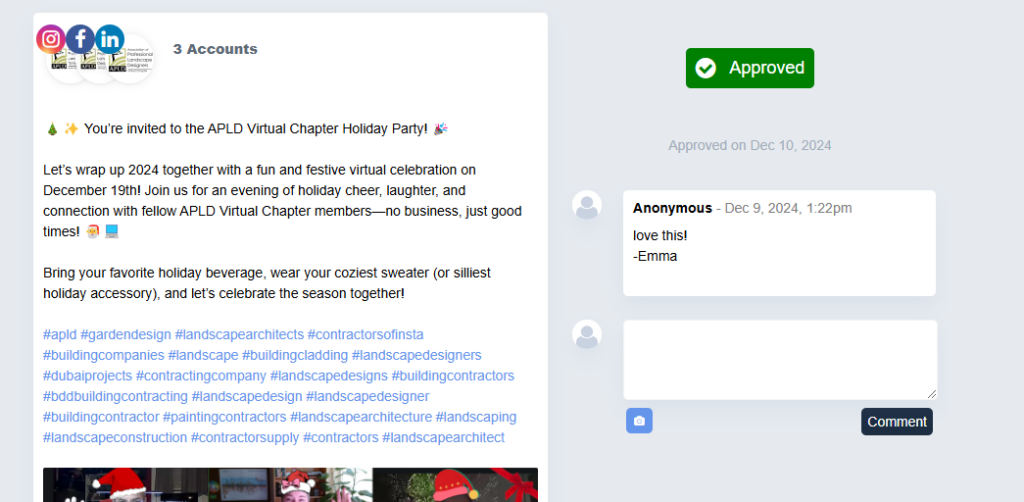
Here’s what the approval process looks like in Cloud Campaign. Clients can see posts, captions, scheduled times, and visuals all in one clean view. They can approve, request changes, or decline—all with a simple click.
Why This Changes Everything:
No more “Did you see my email about the Tuesday post?” conversations
Complete visibility into what’s approved, what’s pending, and what needs revisions
Clients can leave specific feedback directly on posts
Clear audit trail of all approvals and changes
Reduces revision rounds because everything is visual and clear
Before Cloud Campaign, we were managing approvals through a combination of emails, shared Google Docs, and crossed fingers. The time we’ve saved—and the miscommunications we’ve avoided—has been substantial.
4. Unified Scheduling Across All Major Platforms
Schedule posts for Facebook, Instagram, Twitter/X, LinkedIn, and Google Business Profile all from one dashboard. But it’s not just about scheduling—it’s about doing it efficiently when you’re managing multiple clients.
Smart Scheduling Features:
Bulk upload posts via CSV (huge time-saver for planning campaigns)
Content calendar view across all clients (or filtered by specific clients)
Queue system for evergreen content that rotates automatically
Optimal time suggestions based on each platform’s best practices
Preview exactly how posts will look on each platform before publishing
When you’re managing digital marketing for multiple clients, having one central hub for all social media scheduling is non-negotiable. Cloud Campaign delivers this without the complexity that bogs down other platforms.
Analytics and Reporting: Data That Makes Sense
Let’s talk about everyone’s favorite topic: analytics. Just kidding—most people find analytics overwhelming. But Cloud Campaign makes it actually useful.
Why Cloud Campaign’s Analytics Are Different
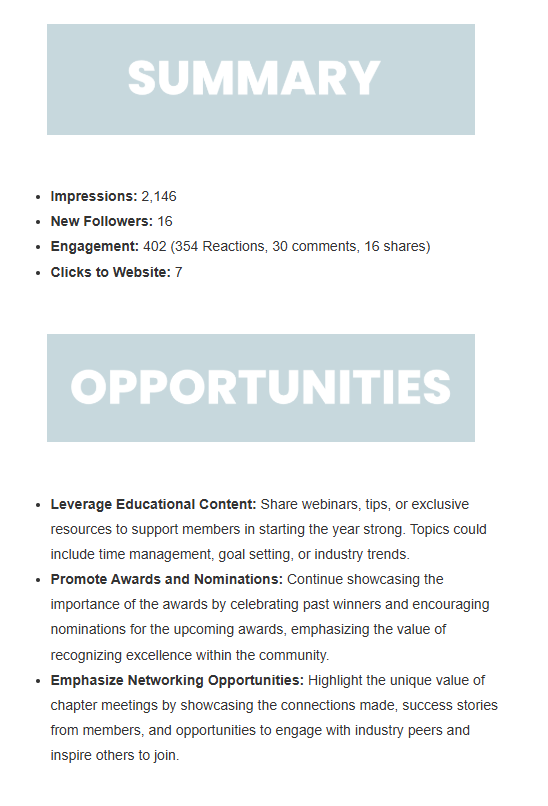
This sample report shows exactly what we mean. The platform highlights key metrics that clients actually care about:
Engagement rates (likes, comments, shares)
Follower growth over time
Best-performing content (so you can do more of what works)
The Real Value: You’re not just collecting data—you’re getting insights that inform strategy. Which types of posts drive the most engagement? What posting times work best? How does this month compare to last month?
Creating Client Reports: The best part? You don’t have to manually compile data from Facebook Insights, Instagram Analytics, Twitter Analytics, and LinkedIn Analytics into one report. Cloud Campaign consolidates everything, and you can export professional-looking reports with your branding.
This alone saves hours every month. Hours you can spend on strategy, creating better content, or actually growing your agency instead of wrestling with spreadsheets.
How We Use Cloud Campaign at Wasson Management + Marketing
Let’s get practical. Here’s our actual workflow using Cloud Campaign:
Monday: Content Planning
Review content calendars for all clients in one view
Identify gaps or opportunities
Plan the week’s content themes
Tuesday-Wednesday: Content Creation and Scheduling
Create graphics and write copy
Schedule posts across all platforms and clients
Submit for client approval through the platform
Thursday: Client Approvals
Clients review and approve (or request edits) through their portals
We make any necessary revisions
Final approval and posts are queued
Friday: Analytics Review
Pull reports for active campaigns
Identify top performers and underperformers
Use insights to inform next week’s strategy
Monthly: Comprehensive Reporting
Generate branded reports for each client
Review with clients in monthly check-ins
Adjust strategy based on data
This workflow is only possible because Cloud Campaign centralizes everything. Before, we were juggling multiple tools, multiple logins, and way too many browser tabs.
The Honest Truth: Cost vs. Value
Let’s address the elephant in the room: Cloud Campaign isn’t the cheapest social media tool available. There are free options, and there are cheaper paid options.
But here’s what we’ve learned: The time Cloud Campaign saves us every single week far exceeds the cost of the platform.
Quick Math:
Average time saved per client per week: 2-3 hours
If we manage 10 clients: 20-30 hours saved weekly
Our billing rate: Let’s say $75/hour (conservative for agency work)
Value of time saved: $1,500-$2,250 per week
Even if Cloud Campaign cost $500/month (it doesn’t—it’s less), we’re getting a 3-5x return just in time savings. Not to mention:
Fewer mistakes (which can cost client relationships)
Happier clients (streamlined experience)
More capacity to take on additional clients
Professional appearance that commands higher rates
The Investment Makes Sense If:
You’re managing 3+ clients
You value your time and want to scale
You’re tired of piecing together multiple tools
You want to look professional and organized
You plan to grow your agency
It Might Not Be Worth It If:
You only manage 1-2 accounts
You’re just starting out with a very limited budget
You’re managing social media for your own business only
For agencies serious about social media management, Cloud Campaign is an investment that pays for itself many times over.
Cloud Campaign vs. Other Social Media Tools: How Does It Compare?
You’re probably wondering how Cloud Campaign stacks up against other tools you might be considering. Here’s our honest comparison:
Cloud Campaign vs. Hootsuite
Winner for Agencies: Cloud Campaign
Why: Better client portal structure, cleaner approval workflows, more intuitive interface for multi-client management
Hootsuite’s Advantage: More enterprise-level features, longer market presence
Cloud Campaign vs. Buffer
Winner for Agencies: Cloud Campaign
Why: Buffer is great for brands managing their own accounts, but lacks the client-specific organization agencies need
Buffer’s Advantage: Lower cost, simpler interface for single-account management
Cloud Campaign vs. Sprout Social
Winner: Depends on needs
Cloud Campaign Advantage: Better for smaller agencies, more affordable, easier learning curve
Sprout Social Advantage: More robust for large enterprises, advanced social listening features
The bottom line: If you’re an agency managing multiple clients, Cloud Campaign is purpose-built for your specific workflow in a way that general social media tools simply aren’t.
Who Should (and Shouldn’t) Use Cloud Campaign
Cloud Campaign Is Perfect For:
Social media agencies managing 3+ clients
Marketing consultants offering social media as a service
Freelancers who want to present a professional, scalable system
Growing agencies that need room to scale
Anyone who’s outgrown basic tools but doesn’t need enterprise-level complexity
You Might Want Something Else If:
You only manage social media for your own business (try Buffer or Later)
You have fewer than 3 clients and budget is extremely tight
You need extremely advanced features like social listening or competitive analysis (try Sprout Social)
You’re managing social media casually or as a small part of a broader role
Getting Started with Cloud Campaign: What to Expect
If you’re ready to try Cloud Campaign, here’s what the getting-started process looks like:
1. Initial Setup (30-60 minutes)
Add your agency branding
Connect your clients’ social media accounts
Set up client portals
Invite team members
2. Learning Curve (1-2 weeks)
The interface is intuitive, but give yourself time to explore features
Set up your first few clients and test the approval workflow
Get comfortable with the scheduling calendar
Learn the reporting features
3. Full Implementation (Week 3+)
Migrate all clients to the platform
Establish your agency’s workflow
Train clients on their portal access
Start seeing the time-saving benefits
Pro Tip: Don’t try to migrate everything at once. Start with 1-2 clients, get comfortable with the system, then gradually move others over. This reduces overwhelm and lets you troubleshoot any issues before scaling.
Real Results: How Cloud Campaign Has Helped Our Agency
Since implementing Cloud Campaign at Wasson Management + Marketing, we’ve seen tangible improvements:
Time Savings:
25+ hours saved per week across all client accounts
80% reduction in approval-related emails
50% faster client onboarding process
Client Satisfaction:
Clients love the transparency of seeing their content calendar
Approval process is clearer and faster
Professional appearance elevates our agency’s credibility
Business Growth:
Capacity to take on 30% more clients without hiring additional staff
More time for strategy and relationship-building (not just task execution)
Higher retention because clients appreciate the organized, professional approach
These aren’t just nice-to-haves—they’re the difference between an agency that’s barely keeping up and one that’s positioned for sustainable growth.
Frequently Asked Questions About Cloud Campaign
Is Cloud Campaign worth the price? For agencies managing multiple clients, absolutely. The time savings alone justify the investment within the first month.
How long does it take to learn? The basics are intuitive—you can start scheduling posts within an hour. Mastering all features takes 1-2 weeks of regular use.
Can clients access the platform? Yes! Clients get their own branded portal where they can review and approve content. They don’t need to pay for their own account.
What platforms does it support? Facebook, Instagram, Twitter/X, LinkedIn, and Google Business Profile—covering the major platforms most businesses use.
Is there a contract or can I cancel anytime? Cloud Campaign offers flexible plans. Check their current terms for cancellation policies.
Do you offer training on Cloud Campaign? As part of our social media management services, we include training on all the tools we use, including Cloud Campaign.
Final Verdict: Should You Use Cloud Campaign?
After extensive use managing multiple clients at our agency, our verdict is clear: Cloud Campaign is essential for social media agencies and multi-client managers who want to scale professionally.
The Pros:
Purpose-built for agencies managing multiple clients
White-label branding elevates your professional image
Streamlined approval workflows save hours every week
Consolidated analytics and reporting
Intuitive interface that’s easy to learn
Room to scale as your agency grows
The Cons:
Premium pricing (though justified by time savings)
Might be overkill if you only manage 1-2 accounts
Some advanced features (like social listening) aren’t included
Our Recommendation: If you’re managing social media for 3+ clients and you’re serious about growing your agency, Cloud Campaign is worth every penny. The professional appearance, time savings, and organizational structure will pay for themselves many times over.
Ready to streamline your social media management and reclaim hours every week?
Get started with Cloud Campaign today and see firsthand why agencies love this platform. Use it for a month and track the time you save—we think you’ll be as impressed as we were.
Not sure you’re ready to commit? That’s okay. Browse through our sample workspace to see exactly how we use the platform for our clients. No pressure, just exploration.
Option 2: Let Us Handle Everything For You
Here’s the truth: Even with the best tools, managing social media for multiple accounts is time-consuming and requires expertise in strategy, content creation, and analytics.
What if you didn’t have to do it at all?
At Wasson Management + Marketing, we specialize in taking social media completely off your plate. We handle everything:
Strategic content planning aligned with your business goals
Professional content creation (graphics, copy, video)
Scheduling across all platforms
Community engagement and responding to comments
Monthly analytics and strategy adjustments
Client communication and approvals
We use tools like Cloud Campaign behind the scenes so you get all the benefits of professional social media management without having to learn new platforms or manage the day-to-day tasks yourself.
This Is Perfect If:
You want professional social media but don’t have time to manage it
You’ve tried doing it yourself and it’s not working
You’d rather focus on running your business than learning another tool
You want consistent, strategic content without the stress
Contact us today for a free consultation and let’s talk about how we can take social media management off your hands completely. We’ll create a customized strategy, handle all the execution, and deliver results while you focus on what you do best.
Not ready for full-service support yet? Check out GrowthIQ for DIY social media strategies, templates, and systems you can implement yourself at your own pace.
The Bottom Line: Better Tools, Better Results
Whether you decide to use Cloud Campaign yourself or hire us to handle your social media management, the key is this: having the right systems in place makes all the difference.
Cloud Campaign has transformed how we work with our clients. It’s saved us time, improved our professionalism, and allowed us to scale our agency without sacrificing quality.
And if you’re looking for an agency that combines great tools with even better strategy? We’d love to talk.
Your social media deserves to work as hard as you do. Let’s make that happen.
We’re an Iowa-based marketing operations team working with businesses all over the U.S.
We’re more than a marketing agency—we’re your behind-the-scenes partners. With over 10 years of experience in small business operations and marketing, we bring the strategy, structure, and heart to help your business grow the right way. You’ll never be just another client here. When you work with Wasson Management Marketing, you get a team that listens, follows through, and shows up with solutions.




view + leave comments . . .